
Your voice, not a robot's
It learns how you write to each person (the emoji with your sister, the polish with a client) and drafts in that voice, in their language.
One inbox for WhatsApp, Instagram, Telegram and SMS
Four apps. Hundreds of chats. Everyone who's waiting on you, in one calm list, on the phone in your pocket, where every message stays, sealed. Kadabox helps you answer. It never answers for you.
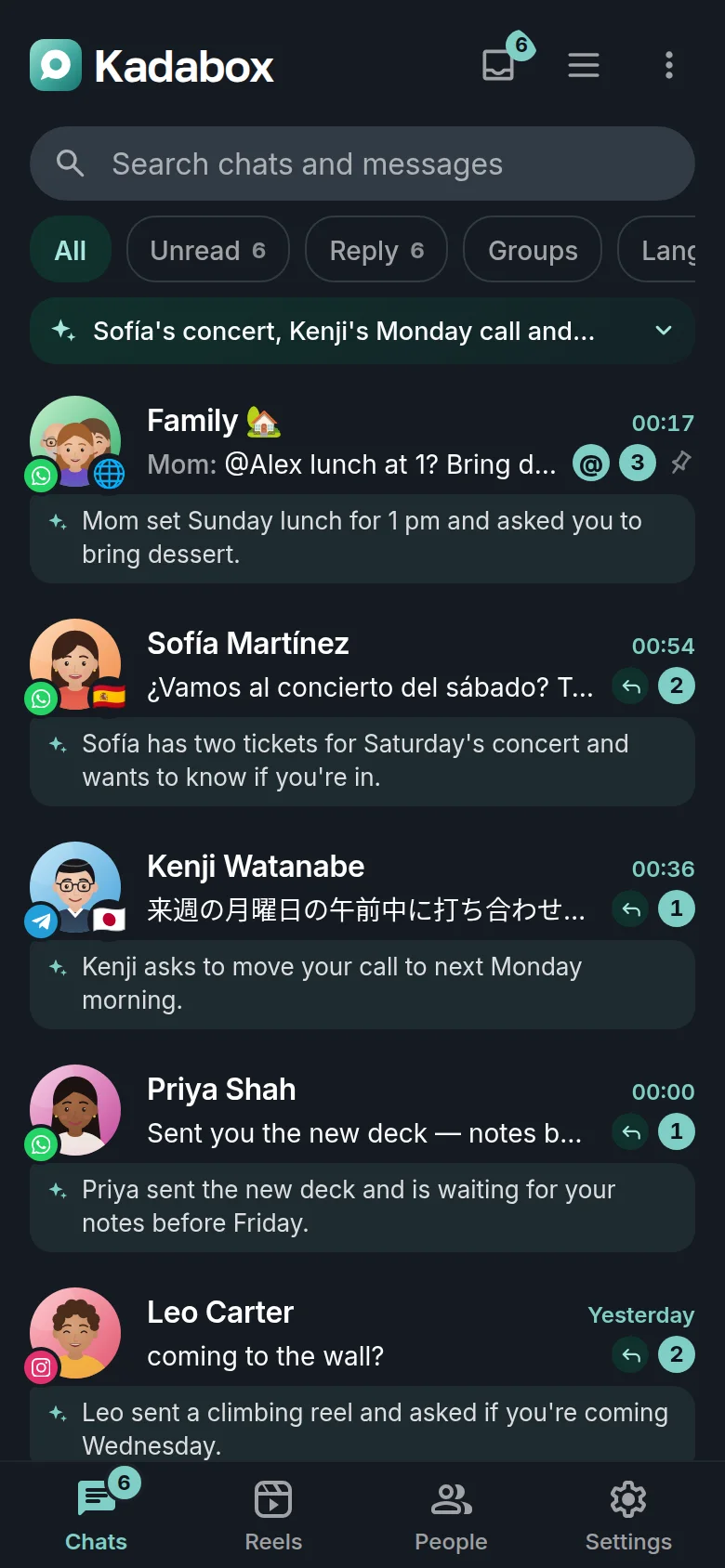
WhatsApp, Instagram, Telegram and SMS side by side, each with a line that says what they want.
The Inbox walks you through everyone you owe an answer. Reply, done, next.
Read Sofía's Spanish in English, answer in Spanish, the way you'd say it.
This is Kadabox's inbox running right here, in your browser, the app's own screens, as a computer and as a phone. Read Sofía's Spanish in English, ask for reply ideas, send one (and undo it), clear the Inbox, like a reel. The people are invented and nothing leaves this page.
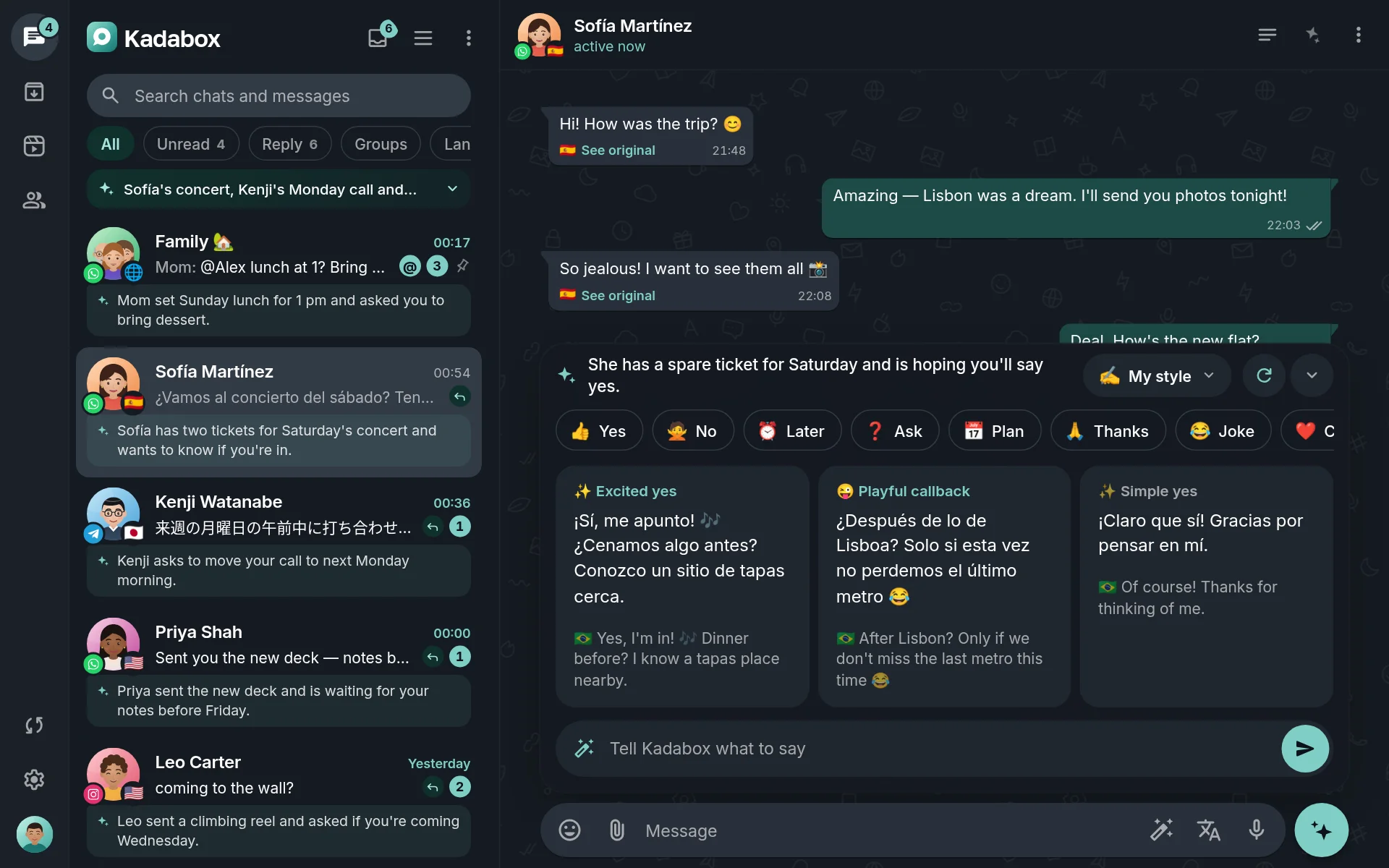
Kadabox puts every conversation from WhatsApp, Instagram, Telegram and SMS in one list, and then does the part the apps never did: it tells you who's waiting, what they want, and walks you through them one by one.
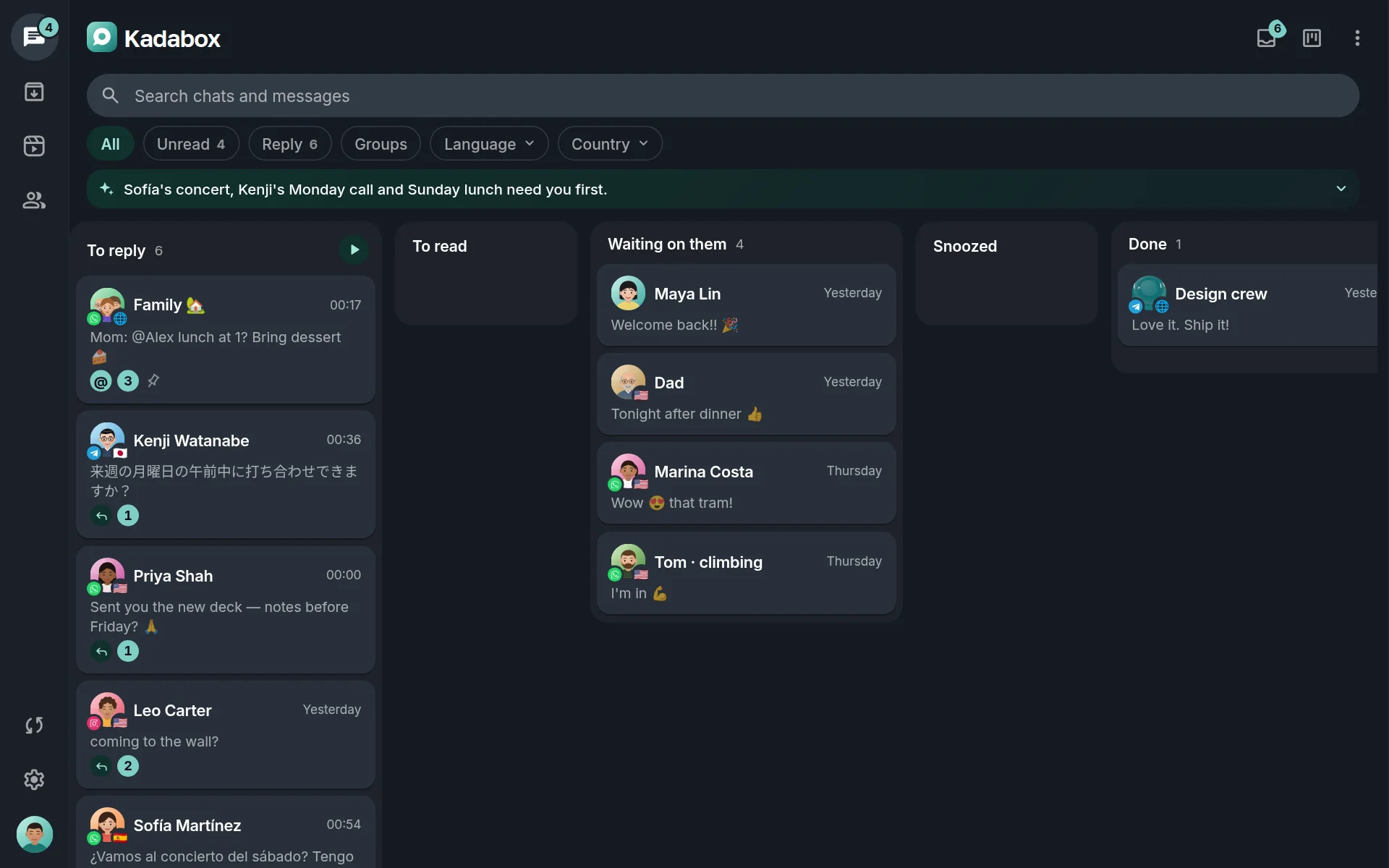
Kadabox knows who's waiting, the friend who asked a question, the group that mentioned you, the client from yesterday. Press start and go through them like a deck: reply, mark done, snooze, next. Until nobody is left.
One line on top says what matters most. Under each chat that's waiting, a short note says what they want, the concert on Saturday, the call on Monday, dessert for Sunday lunch. No priority labels, no red flags: just what's pressing, in words.
Someone sends an Amazon, AliExpress, Temu or Shein link and you see the product: its photos to swipe through, the price and the discount, the rating and what it is. A pinned place arrives as a map with its name and address, Directions one tap away. Photos sent one after another sit in one row you swipe sideways.
Group your chats by what needs you, by app, by who they are (family, friends, work) or by language. Drag a card to Done. Press ▶ on a column to answer everyone in it.
Make a tag for anything (Work, Family, the trip to Lisbon) and gather chats from every app under it. Pick them one by one, or let a tag take every group, every WhatsApp chat or everyone Kadabox knows as family. Each tag becomes a chip over your chats, a tab of its own and a coloured label under its rows.
Hold the send button and pick a time: your phone sends it then, once, or every week for the Monday stand-up. Set a reminder on any message and the chat comes back to your Inbox when it's due. On a birthday, it's waiting for you on top of your chats with ideas for a warm message. And the texts you send often are a “/” away.
Kadabox reads the conversation you're in and helps: drafts in your voice, translation both ways, voice notes you can read, the gist of a long group, what you promised and when. It fills your message box, you decide what goes out.
It learns how you write to each person (the emoji with your sister, the polish with a client) and drafts in that voice, in their language.
Ideas, translations, rewrites and dictation only ever fill your box or a tray. Every message leaves on your tap, with seconds to undo.
On your phone for free, with your own key at cost, or with Kadabox credits. Everything it does by itself has its own switch.
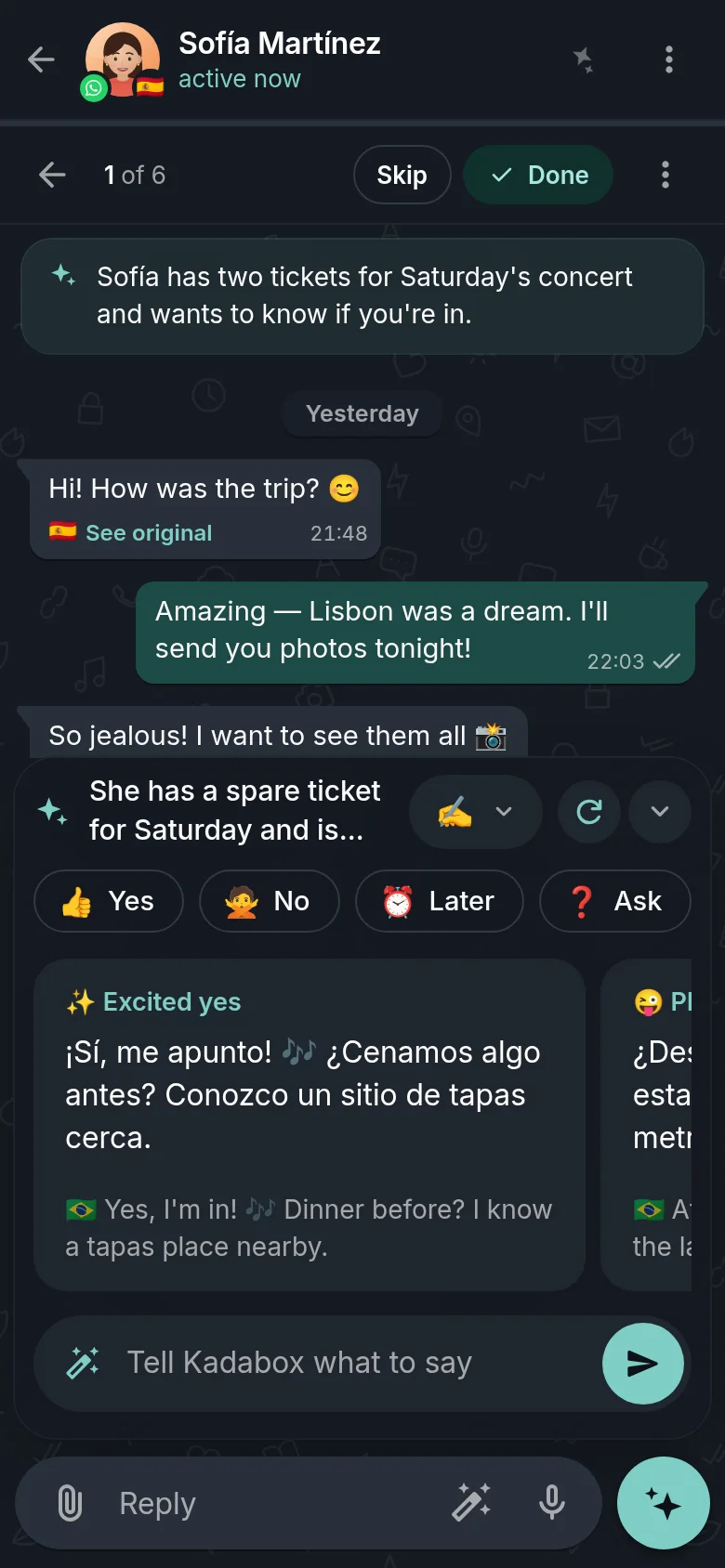
Open a chat and three drafts are waiting, in their language, with what each one means in yours. Two keep the conversation going: a callback, a tease, a plan, a question worth answering. The third simply answers and lets it rest.
yes, but Saturday instead.
She has a spare ticket for Saturday and is hoping you'll say yes.
When you send one of its drafts (as it was, or after editing) Kadabox notes the shape of what you did: which draft you chose, how much you trimmed, the emoji you took out. Never the words. After a handful of sends, new drafts come out closer to what you'd have written yourself, per person, once there's enough to go on.
Turn on a strategy and each draft leans on a different technique, from the classics on making friends and persuading people, written up in our own words, or from any book you upload. Every draft says which technique it used, and why it fits.
Messages in other languages arrive already translated, with the original one tap away. When you reply, Kadabox writes it in their language and the tone you use with them, warm with friends, polished with clients. In a group, it translates only the people who need it.
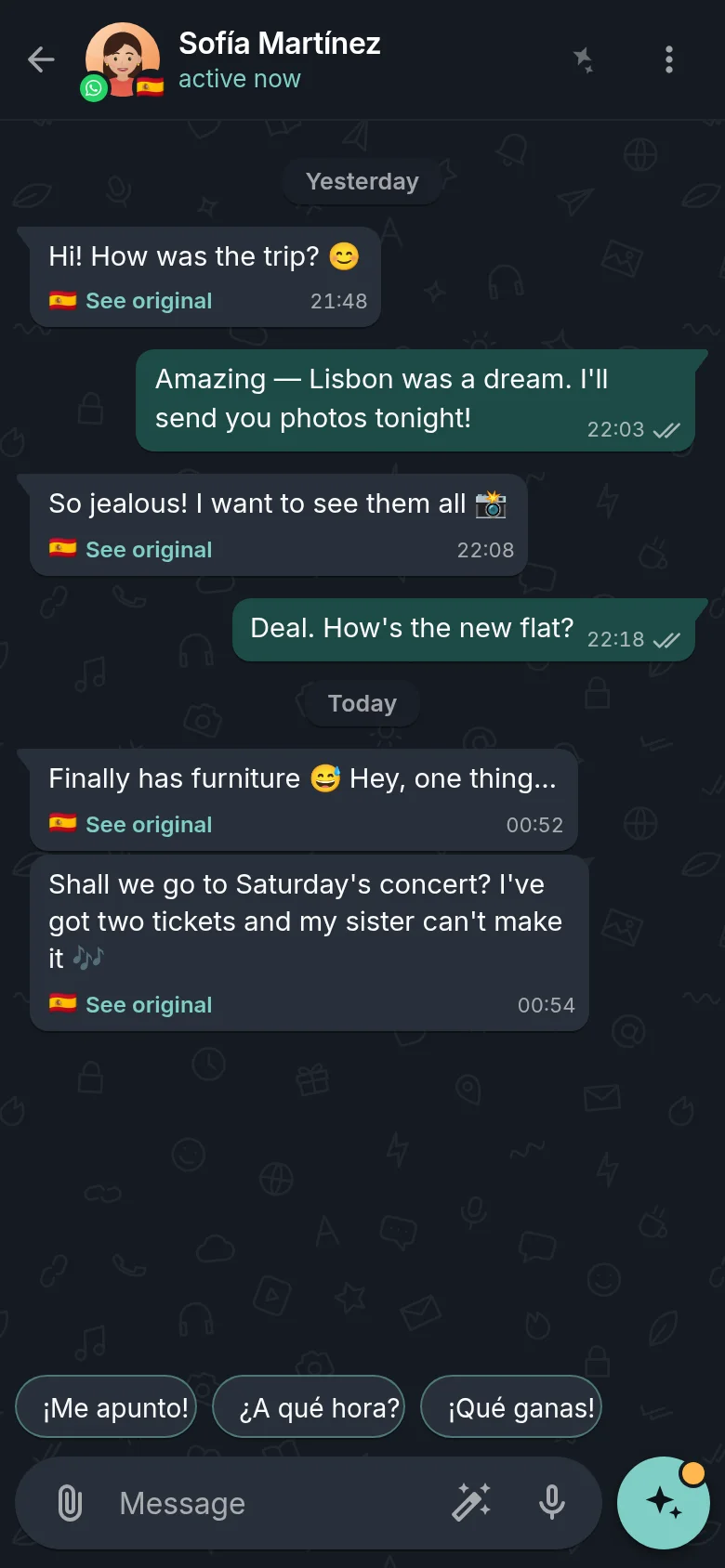
Tap a flag: the same message arrives in their language, Kadabox shows it to you in yours, and your answer goes back in theirs.
Every voice note that arrives is written down as it comes in and tidied up (punctuation, paragraphs, no ums) then translated when the chat needs it. Read it in a meeting, search it next week. And when typing is a chore, hold the mic and talk: Kadabox writes it up as clean messages, splits the long ones, puts them in their language and waits for you.
Who they are to you, what you talk about, how they write and how you write back. Kadabox keeps a small memory of every person, built from your chats on your phone, so ideas sound right for them. Every line is yours to correct, and it keeps your corrections.
Long groups, unfamiliar idioms, promises buried in last week, Kadabox has a tool for each, a tap away in every chat.
A busy group while you were out? Five lines: who said what, what got decided, what's left for you.
Ask a conversation a question in plain words. The answer comes with the messages it came from.
One question across every conversation on every network, the AI search your phones never had.
What you promised, what they asked, the plans and the dates, pulled out of the chat and tickable.
An idiom, a tone, a cultural nuance: what they really mean, and what they want from you.
A wall of text becomes a summary, key points, plain words or a checklist you can tick, right under the message.
Twelve ways to rework a draft, or say how: sound less needy
. And check how it'll land before you send.
Your sentence, finished in your words as you type. Tab takes it; the next key ignores it.
One line over your whole list and a short note under every chat that's waiting, before you open a single one.
Pick per task. Mix them. Change your mind any time, nothing about your chats changes.
A Gemma model, downloaded once, on Wi-Fi while your phone charges. It translates, autocompletes, rewrites, summarizes and transcribes voice notes without a word leaving your phone.
OpenRouter, OpenCode Go or any OpenAI-compatible service. Calls go straight from your phone to the provider, the key never leaves your phone, and we never see the text.
AI included in your plan, no keys, no setup. Routed only to providers set to keep nothing, and we never log what's sent. Top up any time.
AI runs when you tap, or in the background jobs you switched on, each one on the page of the feature it serves and all of them listed together under What runs by itself.
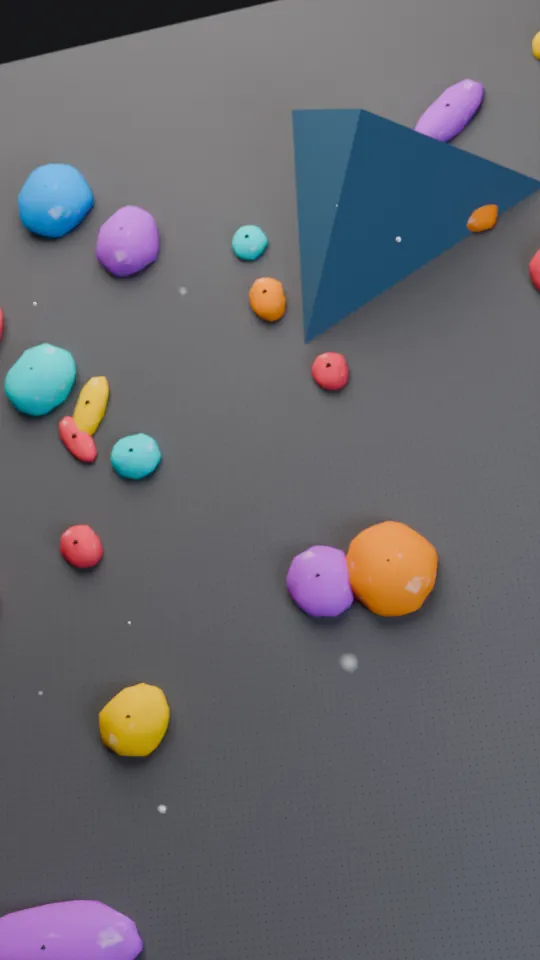
The clip from last night's concert on WhatsApp. The reel your friend shared on Instagram. Photos from the family group. Kadabox gathers every picture and video people send you (from every chat, on every network) into one feed you can swipe through on the couch.
The like lands in their chat as WhatsApp's or Instagram's own ❤️ reaction, after a few seconds you can undo. Tap again to take it back.
Your answer quotes the video in the chat, exactly like a reply in the app itself, with the same undo.
Watched marks follow you to every device: a photo after a moment on screen, a video once you've seen most of it. Skip what you've seen, or show only what's new.
A reel shared in a DM usually arrives as a still. Kadabox fetches the video the moment it's on screen, no embeds, no tracking pixels.
Keep the good ones, save them to your phone, jump to the message in the chat, or open the post in Instagram or the chat in WhatsApp.
Delete from Kadabox only, the chat itself is never touched.
Every picture and video, newest first, under day headers, with your likes, stars and watched marks on the tiles. Combine filters: only Instagram reels from Leo, only the family's photos this week, only what you haven't watched. Try it:
12 photos and videos
 0:12
 Reel❤️
 Post

 ★
 ❤️
 0:09


 ❤️ ★

 0:21
Nothing matches all of those.
Some nights you're not at your best. Turn on Drunk mode and Kadabox stands between you and the message you'd regret: the app glows so you never forget it's on, Send keeps what you write until the morning, and the people you'd rather not text get nothing at all.
Late at night it offers itself when you open Kadabox, when a draft looks risky and in an off-limits chat, or switches on by itself until the morning. Or pick your nights, like Friday and Saturday from 23:00.
Write all you want. Send keeps the message on your phone for the morning, with the reply it answers. Nothing leaves.
Sure it can't wait? Press and hold for ten full seconds. Files, reactions and votes too. Let go and it starts again.
Mark your ex, your boss, anyone. While it's on they get nothing at all, not even with the press, and they leave your list.
A notification brings back what you held. Read it sober, then send, edit or delete each one. Nothing held ever goes by itself.
Turning it off asks first, takes the same ten-second press, then waits a minute, with Keep it on one tap away.
Every send waits a few seconds, so a slip never leaves your phone.
Every chat on every network at once, what they wrote, the translation and the words in their voice notes.
Link Ana's WhatsApp and Instagram: one memory, one history.
Photos, videos, documents, audio and voice notes, with a caption each, and the same undo.
J and K move, Enter sends and opens the next one, X starts the Inbox. Every key can be changed.
Reading in Kadabox never marks anything as read on the network.
Up to twelve Inbox queues of your own. Snooze anyone until later, they come back on their own.
Light or dark, eight wallpapers (one per chat if you like) the text size you like, and five app icons for your home screen.
Tag a starred message with an emoji, and a name, if you like. Starred filters by each one.
WhatsApp polls arrive as polls: every answer with its votes, and yours a tap away.
If you like, someone you've never written to lands in Archived, quietly, one tap brings them in.
The fifth message in a row, a follow-up into days of silence, a wall of text to someone who writes two words, all caps, 3 am, the same words twice: a word before it goes. Read from the chat on your phone; a fix only fills the box, and you can always send. Pick the checks you want, or set them for one person in their Contact info.
Cut the start and the end of a voice note before it goes.
Four apps.One Kadabox.
Each one linked from your phone, like a new device of your own, and as many accounts on each as you have.
Linked with a code, like WhatsApp on a laptop
Sign in inside the app
Through Telegram's official API
Paired with Google Messages by QR
Most inbox apps copy your messages to their servers to work. Kadabox does the opposite: it runs on your phone, the connections to WhatsApp, Instagram, Telegram and SMS, the database, the AI's memory, even a small AI model. All we keep is encrypted data, random numbers that only you can decrypt.
Shall we go to the concert on Saturday? I've got two tickets.
Chats, contacts, photos, memory and the networks' keys live in Kadabox's database on your phone. Not on our servers. Not in anyone's cloud.
The web app reaches your phone through a tunnel encrypted with keys only your two devices have. To our relay it's encrypted data, random numbers only your devices can decrypt.
Your settings, prompts and books in one encrypted file, saved wherever you like. Never your chats or connections. Only your recovery code opens it, and we never hold a copy.
Every message leaves on your tap, after seconds you can undo. The AI only ever fills your message box.
Reading in Kadabox never marks anything read on the network. Archive, pins, stars and watched reels stay on your phone.
Wipe a chat or stop syncing it and it's gone for good, overwritten in the database, not just hidden.
Your phone receives your messages itself and makes its own notifications. No Firebase, no ad network, no one reporting on you.
Your phone talks to WhatsApp and Instagram over your Wi-Fi or mobile data, like any phone, not from a data centre.
Opening Kadabox on a computer never uploads your inbox. It stays on your phone; the browser sees only what your phone sends it, sealed all the way.
Open kadabox.com. The browser creates a brand-new key pair on the spot and shows only the public half, as a QR code. The private half never leaves it.
You scan it with Kadabox, on the phone in your hand. Each side works out the same secret by itself, it's never sent, so there's nothing to intercept.
The QR also carries a one-time secret that never reaches us. Your phone proves its key with it and your browser checks the proof by itself, so a key swapped on the way simply fails.
Every message, photo and voice note crosses our relay in AES-256-GCM, under keys only your two devices hold. A frame that's changed, replayed or out of order is thrown away.
For the technical: X25519 key agreement → HKDF-SHA256 → AES-256-GCM on every frame, with counters as nonces and new keys per connection. Every frame is padded, so even its length stays private. Pairing proves both keys with a 50-bit secret only the QR carries (PBKDF2, 600,000 rounds → HMAC-SHA256). Signing in opens your account, never your inbox.
Signing in opens your account page. Your messages open only in a browser your phone paired, by scanning its code with the phone in your hand, your inbox appears exactly where you said yes.
We keep your email, your plan and your devices' public keys. What crosses our relay is encrypted data, random numbers only you can decrypt, and none of it is kept. Your messages, contacts and memory live on your phone.
Android's encryption and your lock screen guard the phone you have. On a new one, open your backup file and type its code to bring back your settings, prompts and books, then link your chats again and their history comes along.
Kadabox's screens talk to its engine with a 256-bit secret made once on your phone. It's a line only Kadabox speaks on, fast, local and all yours.
Files from contacts open as downloads, links are checked, message formatting is cleaned, and every page runs under a strict security policy. Your inbox shows exactly what people sent you, beautifully and safely.
The model on your phone works without a single byte leaving it. Your own key talks straight to your provider. Kadabox credits run only through providers set to keep nothing, and every request passes through unlogged.
Every AI feature is built so the least possible leaves your phone, and often nothing does.
People bring their chats together three ways today: they switch between apps, they put each app in a tab of a desktop hub, or they use a unified inbox like Beeper. Kadabox is the fourth way, one inbox your own phone runs, with an AI that helps you answer.
Four icons, four badges, four searches, and the chat you meant to answer is always in the other one.
Your messages livein each app
Each app's web page in its own tab of one window on your computer. Handy at a desk; on your phone it's back to switching.
Your messages livein each app's web session
One list for many networks, with apps for phones and computers. A clean inbox to read and send from.
Your messages liveon your devices, a few networks through its cloud
One calm list your phone runs itself, and an AI that writes in your voice, translates both ways, reads your voice notes and tells you who's waiting.
Your messages liveonly on your phone
| Compared | Kadabox | BeeperFree · Plus | Desktop hubsFranz, Rambox, Ferdium | Switching appsEach network's own |
|---|---|---|---|---|
| One inbox | ||||
| Every chat in one list | WhatsApp, Instagram, Telegram and SMS | Over ten networks | One tab per app | One app at a time |
| On your phone | The Android app, all of it | iPhone and Android | Desktop only | Each app's own |
| On any computer | Any browser, end to end from your phone | Desktop apps to install | The app you install | One web app per network |
| Who's waiting, card by card | The Inbox and the brief | Unread, and reminders on Plus | A badge per tab | Scroll and remember |
| Every photo and video in one feed | Reels, from every chat | Chat by chat | App by app | One gallery per app |
| Links that show what they are | Products, places and videos as cards | Link previews | Each app's own | Each app's own |
| AI that helps you answer | ||||
| Reply ideas in your own voice | Three for every message | Not offered | Not offered | Not offered |
| Read and answer in any language | Both ways, by itself | Not offered | Not offered | Copy, paste, translate |
| Voice notes as text | As they arrive, on every plan | On Plus | Not offered | Some apps, some languages |
| Catch me up, ask a chat, to-dos | On a tap, in any chat | Not offered | Catch-up on Franz's cloud plan | Not offered |
| AI that runs on your phone | Free, and nothing leaves it | Not offered | Not offered | Not offered |
| Privacy and calm | ||||
| Where your messages live | Only on your phone | Your devices; a few networks through Beeper Cloud | Each web session, on that computer | In each app |
| Read without sending read receipts | Always, on every plan | Incognito, on Plus | Not offered | A setting in each app |
| Nothing sends without your tap | And a few seconds to undo | Yes | Yes | Yes |
| Price | ||||
| The free plan | 3 accounts, every feature, AI on your phone | Up to 5 accounts | Free tiers, limits vary | Free |
From each product's own pages and FAQ, October 2026, they change, so check their sites. Beeper, Franz, Rambox, Ferdium and Shift belong to their owners; Kadabox isn't affiliated with them.
Everything lives on the phone in your pocket, connected the way it always was. A browser joins it end to end, our cloud only ever carries encrypted data.
Ideas in your voice, translation both ways, voice notes as text and Catch me up, free on your phone, or with your own key at cost.
The Inbox walks you through who's waiting, the brief says why, and Reels puts every photo and video in one feed.
Six chats are waiting. One line on top says the concert and the Monday call come first.
Three voice notes during a meeting? Read them instead, tidied, and translated if they need it.
Card by card: reply with an idea, mark done, snooze. Inbox zero before lunch is over.
Kenji's message arrived in English. Your reply leaves in Japanese, in the polite tone you use with him.
Everything friends sent you today, in one feed, skip what you've watched, double-tap what you love.
The web app is built for the keyboard. Try J, K, Enter, X, N, D, 1, / or E right now.
Download Kadabox, open it and create your account, or skip that and stay local.
WhatsApp by code, Instagram by sign-in, Telegram by phone, SMS by QR. Your history comes along.
On a computer, go to kadabox.com and scan the QR from your phone. Same inbox, same speed.
Kadabox Start isn't a trial: every feature, AI on your phone and your own key at cost, for good. Kadabox Plus is for when you want the AI working before you even open a chat, and more of everything.
Four quick picks, the plan that fits lights up.
Kadabox Start fits you. Everything you picked is in it, for good.
Everything you need, for good.
AI included, working ahead of you.
A model downloaded to your phone, on Wi-Fi while it charges. Quick jobs run there by themselves, and nothing ever leaves.
FreeOpenRouter, OpenCode Go or any OpenAI-compatible service. Your key stays on your phone and you pay your provider directly.
At cost, no markupAI credits included every month, top-ups any time, through providers that keep nothing. No keys, no setup.
Included| Feature | Start | Plus |
|---|---|---|
| Chats | ||
| Chat accounts | 3 | Up to 15 |
| The Inbox, the brief, Reels, translation and search | Included | Included |
| Inbox queues | The default queue | Up to 12 of your own |
| AI | ||
| AI on your phone | Free, nothing leaves | Free, nothing leaves |
| Cloud AI | Your own key, at cost | Monthly credits, top-ups or your own key |
| AI that works ahead of you | A tap away | Ideas ready, memory fresh, the brief on time |
| Strategy books | The built-in sets | Plus your own books, websites and web research |
| Web and safety | ||
| Browsers, end to end | 1 | Unlimited |
| Encrypted backup files | Yours to keep | Yours to keep |
| Your chats, only on your phone | Always | Always |
On your phone, in Kadabox's own database. We keep only encrypted data, random numbers that only you can decrypt.
No. Every message leaves only when you tap send, and you get a few seconds to undo. Reply ideas, translations, rewrites and dictation only fill your message box.
Kadabox noticing what's easy to miss while you type: your fifth message in a row, a follow-up when they haven't answered in days, a message far longer than theirs, all caps, a lot of !!!, the middle of their night, the same words twice, a language they don't write in. It reads the chat on your phone, with no AI. If you like, the AI can also read how it will land once you pause. It never stops you: tap its fix to change the text, ✕ to dismiss, or just send. Settings → Alerts → Heads-up turns each check on or off, and a person's Contact info can set them just for that person. If a note is serious, Kadabox asks once before it goes (Send anyway is one tap), or never, as you choose.
For the nights you're not at your best. Turn it on from the menu, from Settings → Alerts or from your phone's quick settings, or let it come on by itself on the nights you pick. Late at night it also speaks up on its own: it offers itself when you open Kadabox, when a draft looks risky and when you open the chat of someone off-limits, and it can switch itself on until the morning. Settings → Alerts keeps all of it in one place, with the heads-up's checks. While it's on, a warm glow runs around the app, every heads-up check is on, and Send holds the message for the morning instead of sending it. To send now you press and hold for 10 seconds, and that goes for files, reactions and votes too. People you mark off-limits in their Contact info get nothing at all and leave your list until it's over. In the morning a notification brings you back to what you held: you read it and send, edit or delete each one. Nothing held ever goes by itself. Turning Drunk mode off takes the same 10-second press, then waits a minute, with Keep it on.
Yes. Write it, hold the send button and pick a time, your phone sends it then, and it can repeat every day, week, month or year. Every scheduled message stays in the chat's list, where you can send it now, edit it or move it. Scheduling it is your tap: it goes exactly as you wrote it.
Your own folders for chats, from every app at once, Work, Family, a trip. Add chats by hand, or let a tag gather every group, every chat on one app or everyone Kadabox knows as family. Each tag is a chip over your chats, a tab of its own and a coloured label on its rows. Tags live on your phone: nothing changes on the apps, and nobody else sees them.
No. Read state in Kadabox is yours alone, it never marks anything as read on WhatsApp, Instagram, Telegram or SMS. Watching their photos and videos in Reels doesn't tell them either.
Your phone reads the link's page itself (the product's photos, price, rating and description) or draws the map around a pinned place from OpenStreetMap, and keeps the card. Only that one page or map is asked for, from your own connection; nothing of the chat goes anywhere. Settings → Chats → Link cards turns it off, and then a tap on Show details reads one.
Your choice, task by task: a model that runs on your phone for free, your own key from OpenRouter or any compatible provider (straight from your phone, with no markup) or, with Plus, Kadabox credits through providers set to keep nothing.
Yes. Download the free on-phone model and every feature that fits a phone runs there, translation, reply ideas, transcripts, summaries, rewrites. Only studying whole books and web research need a cloud model.
Only what a feature needs, when it runs, a reply idea reads that conversation, the brief reads the chats waiting on you. Everything that runs by itself is listed in Settings, and each one has a switch.
Reply ideas learn the shape of what you send (which draft you picked, how much you edited, emoji in or out) never the words, and only on your phone. You can turn it off or wipe it in Settings.
Yes, a ❤️ in Reels is sent as that network's own reaction, after the same few seconds to undo. Tap it again to take it back. Watched marks are Kadabox's own and stay between your devices.
Kadabox is independent. Telegram connects through its official API; WhatsApp, Instagram and Google Messages connect the way their own linked devices do, from your phone, on your own home connection, so it's simply you on your own device.
Yes, that's exactly what it's built for. A browser joins only when you scan its QR code with your phone, which also carries a secret that proves both keys, and everything between them is sealed end to end with keys only those two devices hold. Your email alone can't open a single message, and one tap on your phone removes any browser.
For everyday chatting, yes: read, answer, react, send photos, files and voice notes, all of it from Kadabox, on your phone and your computer. The apps stay installed, because Kadabox links to them the way a computer does; calls and setting up a new account still happen there.
Yes. Your phone is the inbox: the browser talks to it through an end-to-end encrypted tunnel, so it needs to be online. Everything you open is cached so it feels instant.
Yes. Messages arrive the moment they're sent, and in between Kadabox rests: its background work wakes only when something new comes in, the bigger AI jobs on the phone wait for the charger, and the phone's model lets go of its memory as soon as it's done.
Kadabox is built for Android, where your connections run all day in the background. With an Android phone as your hub, the web version works beautifully in any browser, Safari on iPhone, iPad and Mac included.
Three on Kadabox Start, say, your WhatsApp, Instagram and SMS. Kadabox Plus raises that to fifteen, across any mix of networks.
$9.90 a month, or $99.90 a year, about two months free. AI credits are included every month. Kadabox Start stays free either way, with every feature.
In minutes. Save a backup file wherever you like and keep your recovery code; on the new phone, open it and type the code, and your settings, prompts and books are back. Then link your chats again: each network brings its history along. A backup never holds your chats or connections, and we never hold a backup.
It's the inbox's real look and behaviour, rebuilt to run in this page with invented people and replies written in advance. Nothing you type there is sent or stored.
Four apps become one. Coming soon for Android 9 or newer, link your chats and answer everyone, in your voice.